> For the complete documentation index, see [llms.txt](https://malgn.gitbook.io/cloud/llms.txt). Markdown versions of documentation pages are available by appending `.md` to page URLs; this page is available as [Markdown](https://malgn.gitbook.io/cloud/operation-guide/video-services/wecandio-troubleshooting/manifest-load-error.md).
# manifestLoadError 오류
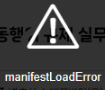 위의 이미지와 같이 문구가 발생할 경우 영상 문제로 인해 재생이 되지 않은 것으로,
위캔디오 비디오팩에 접속하셔서 문제가 되는 영상을 다시 업로드(재인코딩) 진행하셔야 합니다.
(새로운 영상을 업로드 하신 후에 기존에 등록한 영상을 교체하신 후 기존 영상 삭제 진행하셔야 진도율에 문제가 없습니다.)
재인코딩 후에도 동일한 현상이 발생할 경우 고객센터 1:1 문의 게시판에 문의 남겨주시기 바랍니다.
---
# Agent Instructions
This documentation is published with GitBook. GitBook is the documentation platform designed so that both humans and AI agents can read, navigate, and reason over technical content effectively. Learn more at gitbook.com.
## Querying This Documentation
If you need additional information that is not directly available in this page, you can query the documentation dynamically by asking a question.
Perform an HTTP GET request on the current page URL with the `ask` query parameter, and the optional `goal` query parameter:
```
GET https://malgn.gitbook.io/cloud/operation-guide/video-services/wecandio-troubleshooting/manifest-load-error.md?ask=&goal=
```
`ask` is the immediate question: it should be specific, self-contained, and written in natural language.
`goal` is optional and describes the broader end goal you are ultimately trying to accomplish on behalf of the user. GitBook uses it to tailor the answer towards what is most useful for that goal.
The response will contain a direct answer to the question and relevant excerpts and sources from the documentation.
Use this mechanism when the answer is not explicitly present in the current page, you need clarification or additional context, or you want to retrieve related documentation sections.
위의 이미지와 같이 문구가 발생할 경우 영상 문제로 인해 재생이 되지 않은 것으로,
위캔디오 비디오팩에 접속하셔서 문제가 되는 영상을 다시 업로드(재인코딩) 진행하셔야 합니다.
(새로운 영상을 업로드 하신 후에 기존에 등록한 영상을 교체하신 후 기존 영상 삭제 진행하셔야 진도율에 문제가 없습니다.)
재인코딩 후에도 동일한 현상이 발생할 경우 고객센터 1:1 문의 게시판에 문의 남겨주시기 바랍니다.
---
# Agent Instructions
This documentation is published with GitBook. GitBook is the documentation platform designed so that both humans and AI agents can read, navigate, and reason over technical content effectively. Learn more at gitbook.com.
## Querying This Documentation
If you need additional information that is not directly available in this page, you can query the documentation dynamically by asking a question.
Perform an HTTP GET request on the current page URL with the `ask` query parameter, and the optional `goal` query parameter:
```
GET https://malgn.gitbook.io/cloud/operation-guide/video-services/wecandio-troubleshooting/manifest-load-error.md?ask=&goal=
```
`ask` is the immediate question: it should be specific, self-contained, and written in natural language.
`goal` is optional and describes the broader end goal you are ultimately trying to accomplish on behalf of the user. GitBook uses it to tailor the answer towards what is most useful for that goal.
The response will contain a direct answer to the question and relevant excerpts and sources from the documentation.
Use this mechanism when the answer is not explicitly present in the current page, you need clarification or additional context, or you want to retrieve related documentation sections.